Introduction
Project Overview
This case study documents the redesign process of the UCSD mobile app to improve user experience, accessibility, and overall functionality for the UC San Diego community. The project focuses on enhancing navigation, aesthetics, and usability while addressing pain points identified through user research.
Problem Statement
The UCSD mobile app poses substantial challenges with respect to usability for its student user base. These challenges manifest in instances of scroll fatigue, inaccurate navigation, outdated content, and suboptimal performance. Such impediments significantly impede the efficient utilization of the application by students, underscoring the imperative for comprehensive enhancements aimed at elevating its usability and aligning it with contemporary standards.
Our Solution
To enhance the UCSD mobile app’s user experience, our redesign focused on streamlining navigation, improving accessibility, and modernizing the visual interface. By simplifying menu structures, implementing an interactive map, enhancing personalization through customizable dashboards, and ensuring accessibility compliance, we aimed to provide a more efficient, user-friendly, and visually appealing experience. Continuous user feedback and iterative testing were prioritized to ensure the app remains relevant and effective for the UCSD community.
Research
User Research
Interviews were conducted with UCSD students and those who downloaded the UCSD mobile app. We wanted to request several tasks from these users to discover elements that may be inconvenient while using the UCSD mobile app. As the interviewees performed various tasks, we hoped that they would express various opinions about the UCSD mobile app. Additionally, since the interviewees are people who have downloaded the UCSD mobile app and have already used the app, we recognize the possibility that they may not have found any inconveniences because they are already familiar with the app.
Competitive Analysis
By mapping and evaluating these elements, our objective is to extract valuable insights into the mobile app's strengths and areas for improvement. This comprehensive evaluation serves as a foundation for future iterations, ensuring the mobile app provides an intuitively functional and user-friendly experience for the evolving needs of UCSD students.
Design Space #1
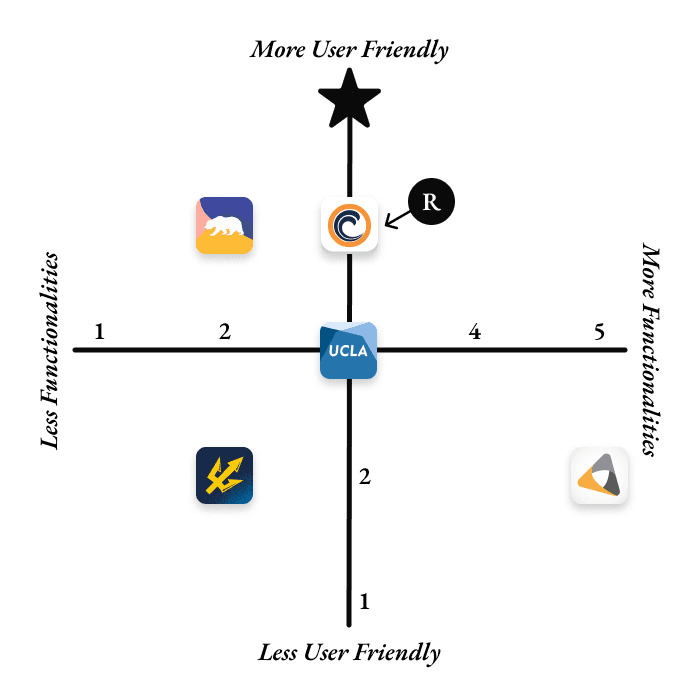
We thoroughly analyzed the UCSD mobile app's functionalities (x) and user-friendliness (y) in exploring a first design space. This exploration involved a detailed examination of the mobile app's accessibility traits and responsiveness to user inputs, comparing these aspects to its industry competitors.
Design Classification | x-axis: Functionalities (1 = Less; 5 = More) | y-axis: User Friendliness (1 = Less; 5 = More) |
UCSD Mobile | 2 | 2 |
UCB Mobile | 2 | 4 |
UCLA Mobile | 3 | 3 |
OCC Mobile | 3 | 4 |
InSite | 5 | 2 |
★ Hypothetical Ideal Design | 3 | 5 |
(R) Redesign | 3 | 4 |
Key Findings
In terms of functionality (x), the UCSD and UCB mobile apps are rated at 2, indicating a lower level of functionalities, while the UCLA and OCC mobile apps boast a rating of 3, suggesting a moderate level of functionalities. Notably, InSite earns a higher functionality rating of 5, showcasing its extensive feature set. The hypothetical ideal design is rated at 3, signifying a balanced approach to functionalities.
Design Space #2
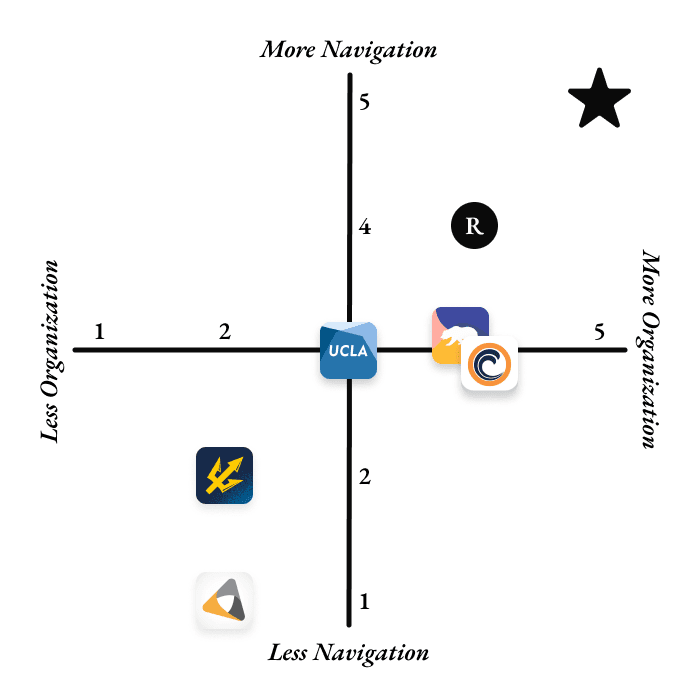
We thoroughly analyzed the UCSD mobile app's organization (x) and ease of navigation (y) in exploring a second design space. This exploration involved a detailed examination of the mobile app's structural layout and efficiency of its navigation system, comparing these aspects to its industry competitors.
Design Classification | x-axis: Organization (1 = Less; 5 = More) | y-axis: Navigation (1 = Less; 5 = More) |
UCSD Mobile | 2 | 2 |
UCB Mobile | 4 | 3 |
UCLA Mobile | 3 | 3 |
OCC Mobile | 4 | 3 |
InSite | 2 | 1 |
★ Hypothetical Ideal Design | 5 | 5 |
(R) Redesign | 4 | 4 |
Design
Sketches
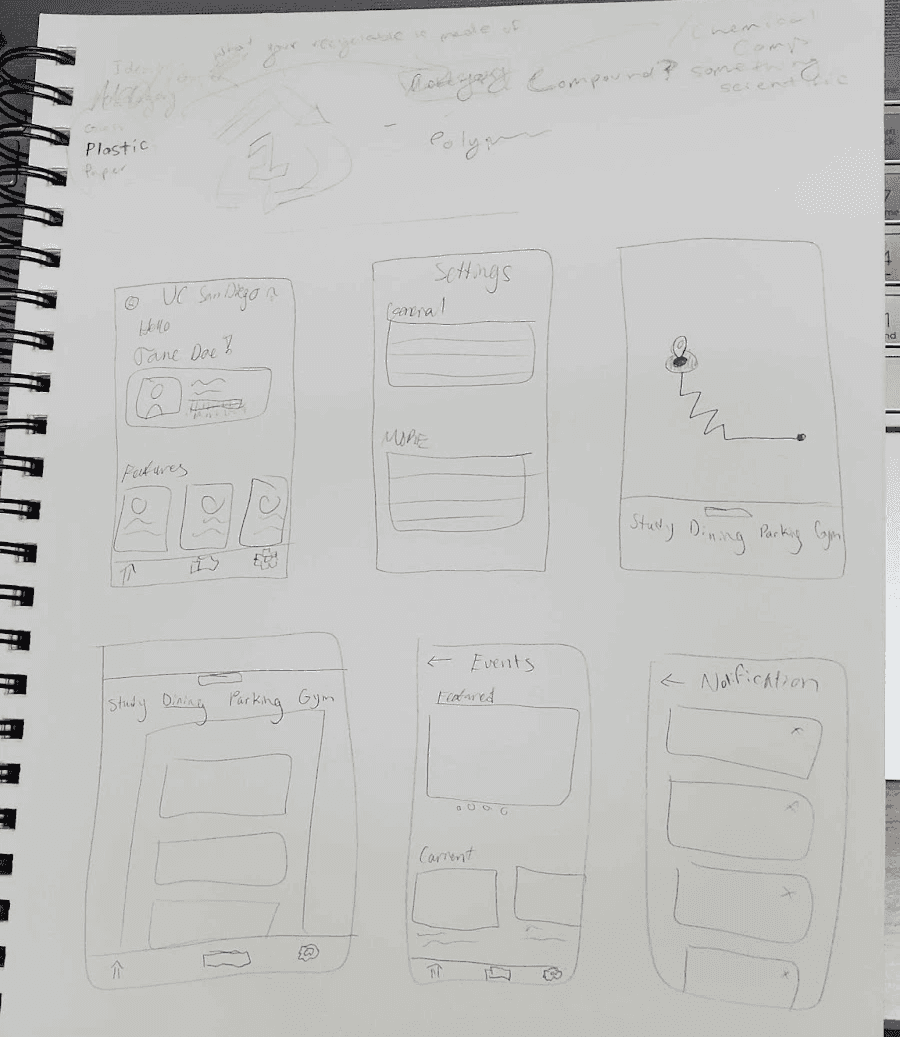
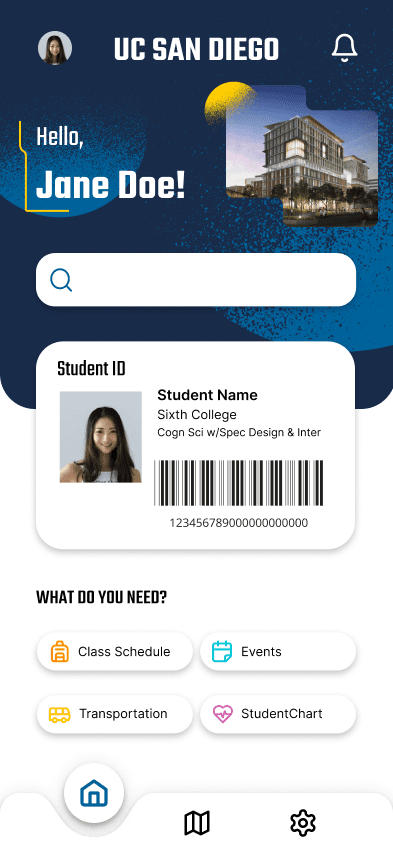
When brainstorming on what aspects to change from the UCSD app, we looked back on user feedback from surveys. From this, we learned that there were several issues with the current navigation through features in the app which included the amount of scrolling as well as wrong directions, etc. As a result, we wanted to focus on fixing or at least minimizing these issues which is what we worked on through sketches. We had a more straightforward layout which was influenced by looking at other school apps from our design spaces such as UC Berkeley Mobile. With our rough sketch and ideas from interview responses, we had a direction that we wanted to go into and started working on Figma by incorporating key features that users used often, like their student ID, alongside more streamlined new features like incorporating a more UCSD-centered map. We were able to discover and identify the main pain points of users, and by reflecting on the feedback, we aimed to simplify the layout of the app and make features more accessible and user-friendly.
First Redesign
The final prototype did not go through many iterations. Still, it is interesting to reflect on the different designs we came up with as a team. The first redesign was a mid-fidelity wireframe to address the main problems of the original UC San Diego mobile app: endless scrolling and clutter of features. These issues go hand-in-hand as the amount of features on the app causes users to scroll through until they find what they are looking for. According to our data, 7 out of 18 participants emphasized a need for some sort of search feature, and 8 out of 18 participants requested fewer features on the app by getting rid of some that are not useful (i.e., Weather Card).
Decluttering the Homepage
Designing a More Intuitive Map Page
Second Redesign
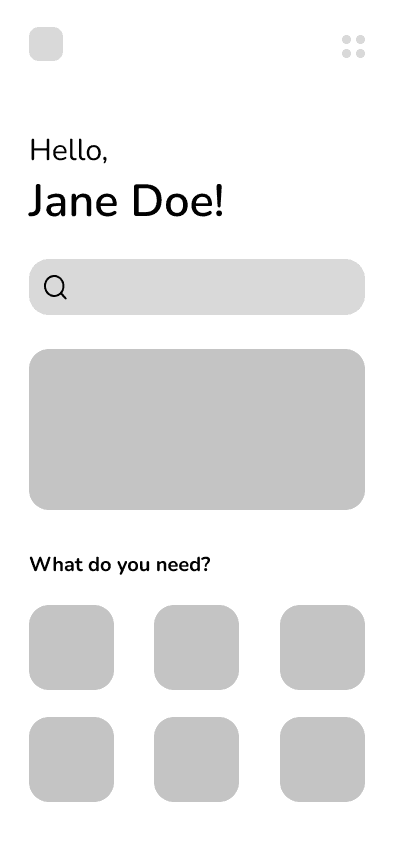
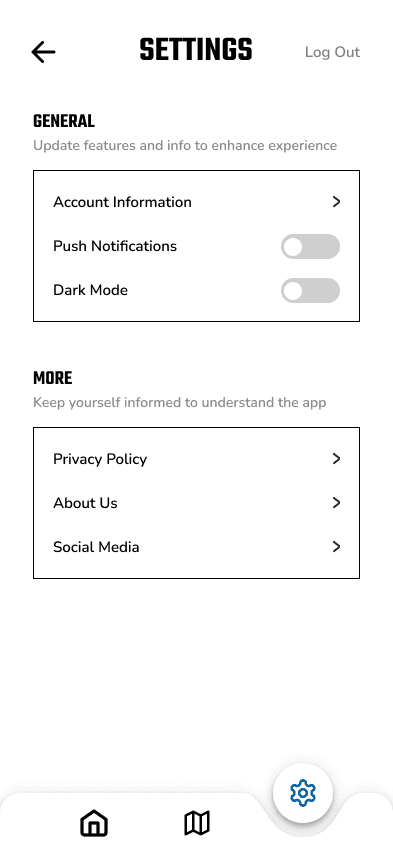
Although we did not go into much depth with the second iteration of this redesign, we did take some important aspects into account when creating the high-fidelity wireframes for our final redesign prototype.
Adding a Search Bar to the Homepage
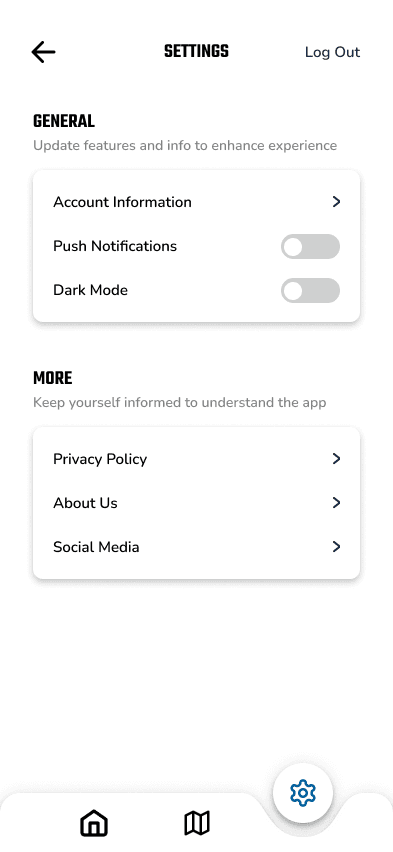
Turning the Profile Page into a Settings Page
Final Design
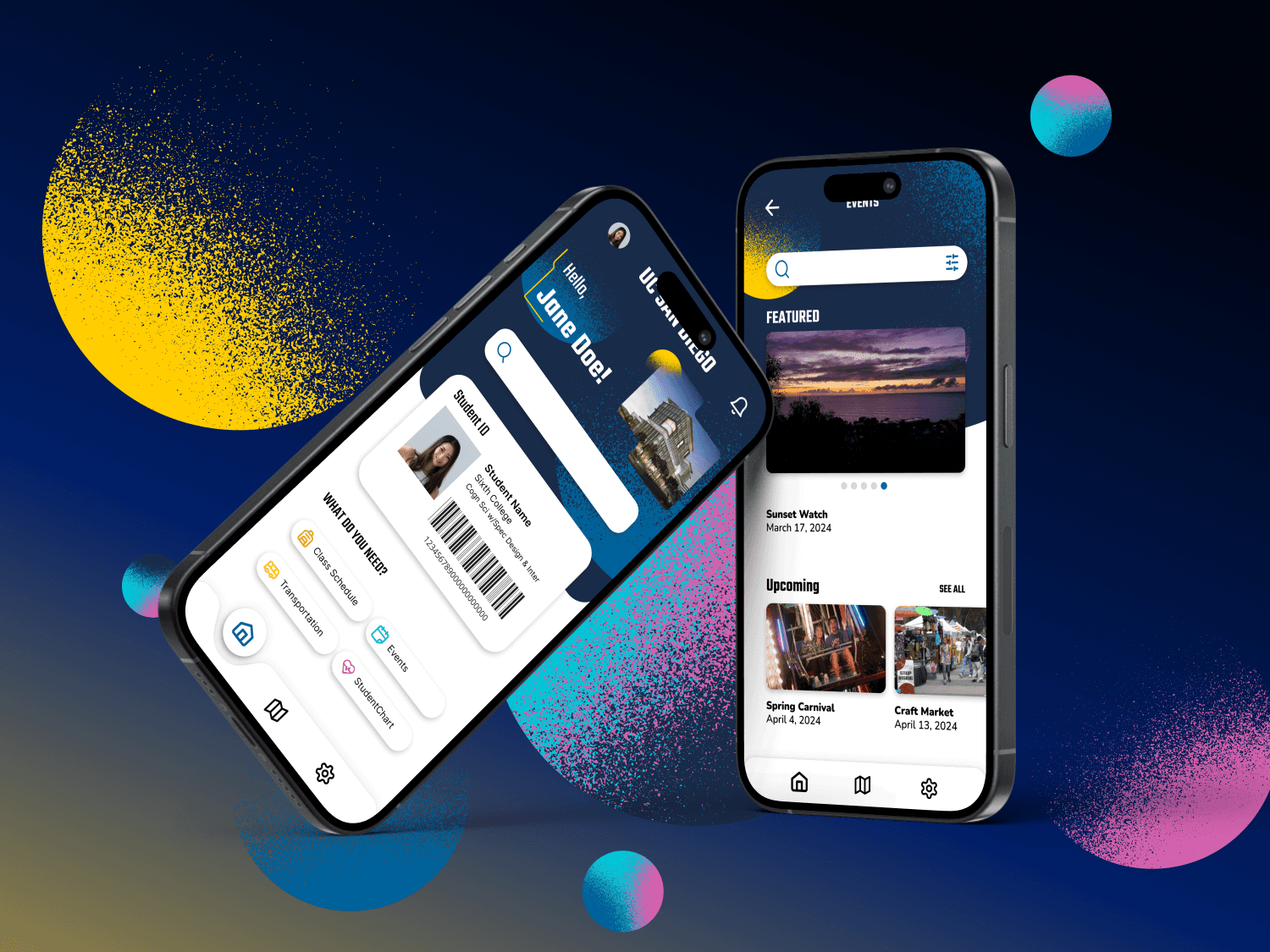
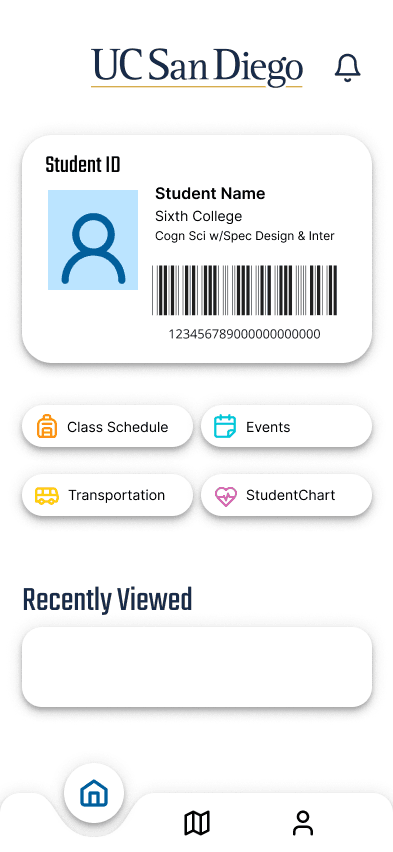
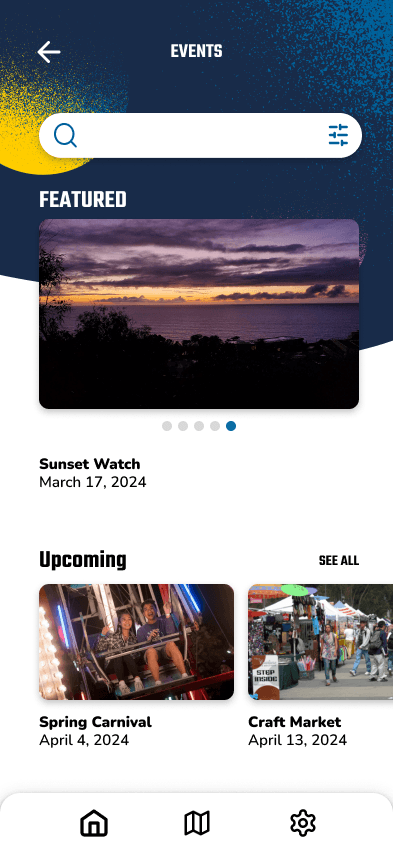
For our final redesign, we decided to combine features from the first and second redesigns to achieve a product we were all satisfied with. This also meant developing and including a branding style for the app to give it a polished look before exporting it as a mockup.
Finalized Homepage
Adding a Search Bar on the Events Page and Simplifying the Layout
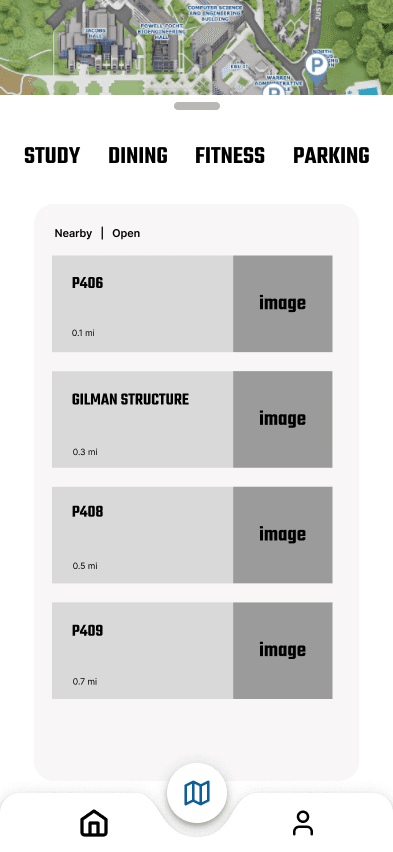
Making the Map Page Interactive

Finalizing the Settings Page
Moving Forward
Although we are very proud of the work we have accomplished, we can’t help but wish we could implement new unique features on top of improving the existing ones. If there was more time, we would’ve like to research more about other websites and apps that are associated with UC San Diego that can be implemented into the app. An example would be the KSDT radio station. None of us knew we had a radio station until someone mentioned it to us. If we could implement that feature into the app, it could help the radio station grow its audience.
We also wanted to improve on the busyness building feature, something that participants were not tested on. Instead of a horizontal meter with a percentage to tell users how busy a certain building is, users can see a bar graph to show what time is the building the most packed. This would be similar to what we see on Google Maps. Overall, through utilizing the double diamond model, we were able to create a design that we felt proud of after frequently iterating, tweaking small changes, and diverging as well as converging to our final product.
Conclusion
We gathered insights by interviewing 18 participants, focusing on user motivations, errors, satisfaction, and expectations. Key findings revealed that users primarily relied on features like Student ID, busyness, and navigation, while many were unaware of other functionalities or found them unhelpful. Most participants would not recommend the app, highlighting usability issues.
Our redesign addressed these concerns by enhancing navigation, adding a search bar to reduce scrolling, providing an interactive map for better accuracy, and reorganizing the settings page for improved customization. We also compared the UCSD app against other collegiate apps to identify areas for improvement.
Future work would involve gathering feedback from the broader student body, implementing suggestions, and developing a functional prototype using frameworks like Flutter, which would aim to refine and expand the app’s features until reaching a polished final product.